



A technical SEO audit should cover five things: crawlability and indexation, site architecture, page speed and mobile, security and markup, and a report that turns findings into fixes. Here is the exact checklist I use.
A technical SEO audit should cover crawlability, site architecture, page speed, security, and markup. It should address everything that prevents search engines from finding and ranking your pages. Broken sitemaps still show up on about one in four sites I audit, which shows how often simple issues get missed. Mobile devices account for roughly 62 to 64% of online traffic, so I approach every technical SEO audit checklist with a mobile-first mindset. This piece breaks my technical SEO checklist into five sections and includes the audit template I use when I run a technical SEO audit for agencies and e-commerce brands.
The audit at a glance
| Section | What I check | Where I look |
|---|---|---|
| 1. Crawlability and indexation | robots.txt, XML sitemap, canonicals, JavaScript rendering, server logs | Search Console coverage, log files |
| 2. Architecture and internal linking | Click depth, orphan pages, redirects, facets, pagination | Crawl data vs. XML sitemap |
| 3. Page speed and mobile | LCP, INP, CLS, images, fonts, caching, mobile parity | PageSpeed Insights, CrUX, Lighthouse |
| 4. Security and markup | HTTPS, mixed content, titles, headings, schema, hreflang | Rich Results Test, URL Inspection |
| 5. Reporting and follow-up | Evidence, priorities, owners, recrawls | Search Console, monthly mini audit |
Crawlability and Indexation

Crawlability comes first: if Google can’t reach a page, nothing else matters. Image: Google Search Central.
Crawlability and indexation come first because nothing else in this audit matters if Google can't find or index the page in the first place. I start every technical SEO audit here, before I look at speed, architecture, or markup.
I begin with the robots.txt file. I check whether it accidentally blocks a section that should be indexable, whether it references the correct XML sitemap, and whether staging-environment rules were ever left in place on the live site — a surprisingly common issue after a migration or redesign. Next I pull the XML sitemap itself and confirm it only lists canonical, indexable, 200-status URLs. A sitemap padded with redirects, 404s, or noindexed pages wastes crawl budget and signals a messier site than it needs to.
From there I move to the canonical tags across templates. Each indexable page should have exactly one self-referencing canonical, and I flag any page pointing its canonical somewhere else without a clear reason. I also check how the site handles JavaScript-rendered content: if key text or links only appear after client-side rendering, I confirm Googlebot can actually render and index them, since not every crawler renders JavaScript the same way a browser does.
Server log analysis is the step most audits skip. Log files show exactly which pages Googlebot is actually crawling, how often, and which pages it's ignoring — which tells me whether crawl budget is being spent on the pages that matter or wasted on parameter URLs, duplicate content, or pages that should never have been crawlable in the first place. I compare that against the Index Coverage report in Search Console to catch any gap between what I expect to be indexed and what Google has actually indexed, and I treat a growing “Crawled – currently not indexed” count as an early warning sign worth investigating before it grows further.
Site Architecture and Internal Linking
Architecture decides whether authority actually reaches the pages you want to rank.
Once I've confirmed that Google can crawl and index the right pages, I review how those pages connect. Site architecture and internal linking determine whether authority reaches the pages I want to rank. This part of my technical SEO audit checklist catches issues that crawlability checks alone may miss.
Navigation, Breadcrumbs, and Click Depth
I see breadcrumbs as more than a UX feature during a technical SEO audit. They are one of the few site elements built around a business's information architecture instead of technical limits such as URL folders or crawl depth. Breadcrumbs should support the global navigation bar, not replace it. They should show a page's place in the site hierarchy rather than a user's session history, which can create a long and repetitive trail.
Polyhierarchical sites may place one page under several parent pages. In those cases, I check that the site selects one canonical breadcrumb path rather than showing multiple routes or tailoring the trail to each visitor. Multiple paths send mixed signals to search engines. I also confirm that the trail begins with a homepage link, places the current page last without a link, and only uses items tied to real pages that users can visit. Logical categories without a dedicated URL should not appear in the trail.
Sites with only one or two levels do not need breadcrumbs, since they offer little value on flat or linear hierarchies. I also check click depth directly. Important pages should usually sit within one to three clicks of a hub rather than six levels deep. Comparing click depth with the directory tree helps me identify sections that have become overly nested or unbalanced.
Broken Links, Orphan Pages, and Anchor Text
A healthy internal linking structure follows a pyramid. The homepage sits at the top, while hub or category pages link to blog posts and product pages below. Pages within one link of the homepage appear most important to search engines.
My internal link audit checks five common failure patterns:
To find orphan pages, I compare XML sitemap URLs with crawl data, then filter the crawl export for pages with zero inlinks. Sitemap entries missing from the crawl graph are often orphaned.
What I see most oftenA systematic internal linking review can reveal that 40 to 60% of pages have no inbound internal links. This usually happens on flat architectures that lack contextual linking.
Broken links need separate treatment. A direct 404 requires an updated or removed link. Redirect chains require a direct link to the final 200 URL instead of several 301 hops, since crawlers may abandon the chain and each hop can weaken equity.
Google has stated that link equity does not disappear through 3xx redirects. I still clean them up to preserve crawl budget, because Googlebot should not need to crawl the same link twice. Pages with more than 100 internal links, including header and footer links, can look spammy to search engines and overwhelm readers — I flag templates that cross that threshold.
For anchor text, I pull the internal authority score for each page, which ranges from 0 to 100 based on relative link weight; key pages should rank close to 100. I revise anchors that repeat the same exact-match keyword across the site or use generic wording — both patterns create relevance confusion instead of clarity. A quarterly internal link audit, supported by a lighter monthly check for broken links and orphan pages, works well for most sites that publish often.
URL Structure, Duplicate Content, and Faceted Navigation
Poor information architecture causes two separate issues: pages may never receive proper indexation, and the site may lack landing pages for target keywords. Faceted navigation often creates this problem, because it lets visitors filter products by size, color, or designer, while each combination can produce a separate URL.
I check whether the deepest facet page has no more than 100 products. That limit keeps the page count manageable while supporting full catalog indexation. I also distinguish facets from filters: facets should have their own indexable URL, while filters should remain JavaScript-driven or noindexed so they do not compete with facet pages for the same query.
Parameter combinations can grow into millions on large catalogs. Google may find thousands of similar pages and struggle to select a primary version, which causes keyword cannibalization. I run a short diagnostic review of faceted sections:
| Check | What I'm looking for |
|---|---|
| Single filter applied | Whether the URL uses a parameter, fragment, or path, and whether the order stays consistent with multiple filters |
| Filter markup | Whether filters use <a> tags crawlers can follow or <button> elements crawlers cannot follow |
| Empty result pages | Whether a no-match filter returns a 200 or a proper 404 |
| Indexed count | site:domain.com results compared with the sitemap URL count to identify index bloat |
Based on the findings, I address faceted duplication with a robots.txt disallow, a noindex tag, a self-referencing canonical, or a nofollow attribute on filter links. Another option is to move filters to JavaScript with button elements and the History API, so Googlebot does not find parameter URLs at all. A filtered page that earns enough traffic to merit its own ranking opportunity needs a unique title, H1, and self-referencing canonical — it should not remain an accidental duplicate.
Crawlable Pagination and Infinite Scroll
Infinite scroll can improve the user experience, but it creates a discovery gap. Crawlers cannot scroll or select a “load more” button as a person would, so they may never crawl items that load after the original view. I check whether the site creates a paginated series of component pages alongside infinite scroll. Each page needs a complete, unique URL instead of a fragment, since Google recommends full URLs to prevent configuration errors.
I also test whether pushState or replaceState works correctly so users can return through recently loaded content. Pages outside the valid range, such as a page number beyond the final page, should return a proper 404. Standard pagination requires each page to have a self-referencing canonical rather than a canonical pointing to page one — sending all signals to the root page can reduce deeper pages' visibility.
Next and previous links should use crawlable <a href> anchors instead of JavaScript-only navigation, since Google will not select buttons to reveal deeper pages. Clean hierarchical pagination URLs, such as /category/page/2/, work better for crawlers and users than unclear query strings. I also flag pagination that relies on fragment identifiers, because search engines ignore everything after the # symbol and treat the fragment URL as the same as the base page.
Page Speed and Mobile Experience
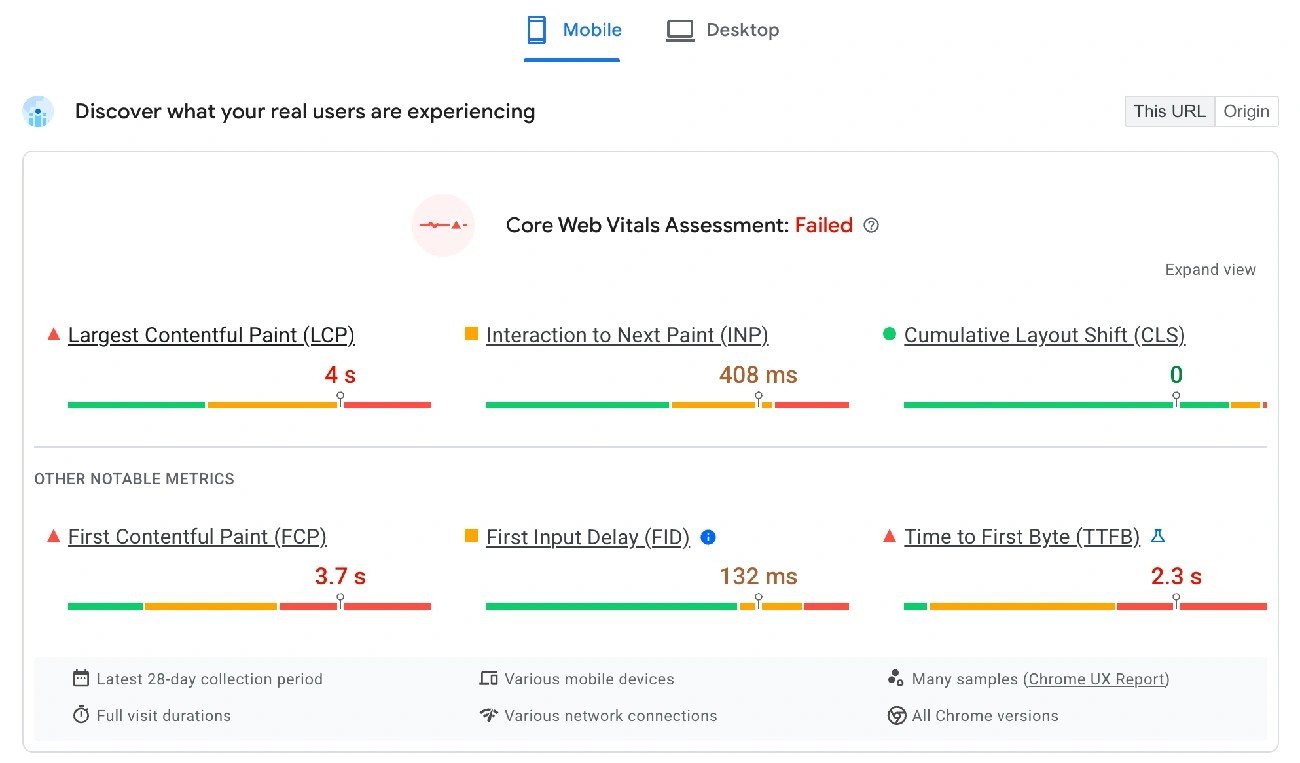
A Core Web Vitals report on mobile: LCP, INP, and CLS tell me where a template is slow. Image: web.dev.
Speed and mobile usability come next on my technical SEO audit checklist. Google indexes and ranks pages through a site's mobile version under mobile-first indexing, rather than its desktop version. A page may load well on a desktop connection but still frustrate someone using a mid-range phone. This section of my technical SEO audit template is designed to catch that gap.
Representative Templates and Field Versus Lab Data
I never test only the homepage. I select one URL for each template — product, category, blog post, checkout — because templates render differently, and one fast page can hide slow pages elsewhere on the site. I run every template through PageSpeed Insights and compare lab results with real field data, since lab tools can only estimate what visitors experience. Desktop emulators show only part of the picture, so I test real smartphones under throttled conditions. WebPageTest, Chrome DevTools, and Lighthouse help simulate slow 3G connections and limited CPU power, which exposes bottlenecks that a fast office connection would not reveal.
LCP, INP, and CLS Measurements
Core Web Vitals are the foundation of this check. I pull Largest Contentful Paint, Interaction to Next Paint, and Cumulative Layout Shift data for every template I flag. First Contentful Paint is not officially a core vital, but Google still tracks it in the CrUX report — it should load within 1.8 seconds to receive a good rating. At least 75% of visitors must have a good experience across these metrics to avoid a search ranking penalty.
Don’t trust the averageA passing average score does not prove the page works well for everyone. A text node that serves as the Largest Contentful Paint element may rely on a web font; slow font loading can lower the entire metric, so I check for that issue before blaming images or scripts.
Images, Fonts, and Render-Blocking Resources
Oversized images, late-discovered fonts, and render-blocking CSS or JavaScript in the page head are common issues. Font checks cover whether @font-face declarations load through an external stylesheet — the browser cannot begin the download until it finishes parsing that stylesheet, so I recommend preload or an inline declaration in the head to resolve the problem. I also confirm that the site uses WOFF2, since it compresses noticeably better than WOFF, and that font files contain only the characters the page actually needs.
The font-display value also matters. swap displays fallback text at once, although it can cause layout shifts. optional uses the web font only if it arrives within 100 milliseconds — otherwise the browser uses a fallback and caches the font for future visits.
I separate resources that block rendering, such as CSS and synchronous JavaScript in the head, from resources that do not, including images, fonts, and scripts marked async or defer. Small CSS files under 10KB may be suitable for direct inclusion in the HTML. Chrome DevTools' Coverage tab helps me find unused CSS and JavaScript that slow the page. Google's image guidance also matters: use high-resolution images in supported formats, avoid URLs that change with every page load, and keep alt text and nearby content similar between mobile and desktop versions.
Server Response Times, Compression, Caching, and CDNs
A slow Time to First Byte weakens every other improvement, because the browser cannot render until the HTML document begins to arrive. I check server response time, then confirm that compression and caching headers are configured correctly. I also verify that a content delivery network reduces the physical distance between the server and the visitor. Self-hosted fonts need a CDN, HTTP/2 or HTTP/3, and the correct caching headers — missing any of these creates avoidable delays on every page load.
Responsive Layouts, Content Parity, and Interactive Elements
Google recommends responsive design rather than dynamic serving or separate mobile URLs — it is the easiest configuration to implement and maintain without user-agent sniffing. A responsive layout still needs a short usability review:
I also check the mobile site with the URL Inspection tool. This helps identify resources blocked by robots.txt and confirms that lazy-loaded content appears during the original render. The Rich Results Test then confirms that structured data loads correctly on mobile.
Security and Technical Markup
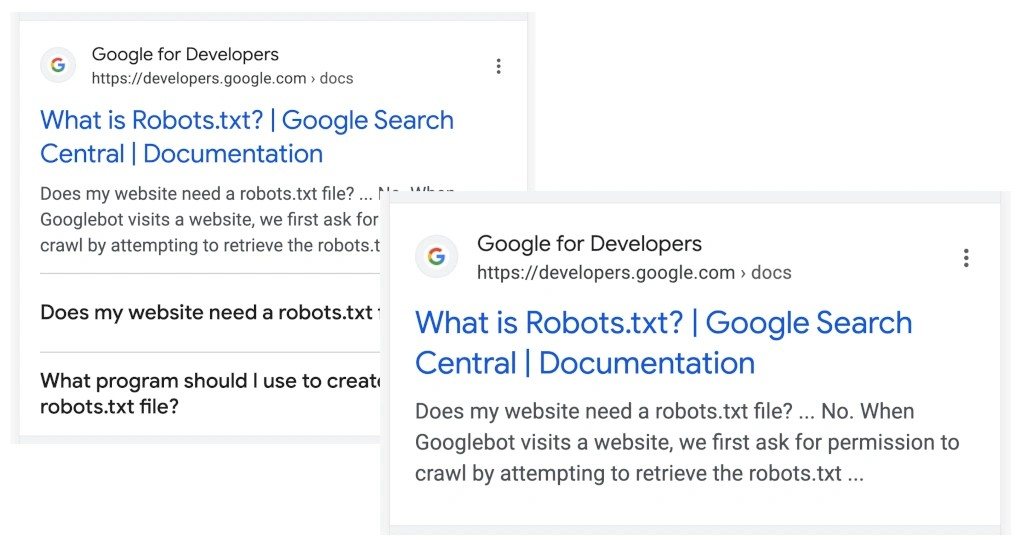
Your title tag and meta description decide how a result looks in search. Image: Google for Developers.
Security signals and on-page markup complete this part of my technical SEO audit checklist. Broken trust indicators or incorrect schema can limit a page's performance, even if crawling and speed are clean. I use this stage as the final trust check before the technical SEO audit ends.
HTTPS, TLS Certificates, Mixed Content, and HTTP Status Codes
I first confirm that every page loads over HTTPS, then check the certificate before reviewing anything deeper. Mixed content is the most common issue I find — it occurs when an HTTPS page still loads resources over plain HTTP, so the connection only appears secure. I review the two types separately:
| Type | Examples | Risk |
|---|---|---|
| Passive mixed content | Images or videos loaded over HTTP | An attacker can block or replace these files, but cannot change the rest of the page |
| Active mixed content | Scripts or stylesheets loaded over HTTP | Can compromise the whole page, steal credentials, or redirect visitors — much higher risk |
I check the browser console for mixed-content warnings and review the source code for http:// references in scripts or API calls, then replace those references with HTTPS equivalents. Sites that repeatedly face this problem should use HTTP Strict Transport Security with a Content Security Policy to prevent insecure resource loading in the browser. I finish by scanning site-wide status codes, since unexpected 4xx or 5xx responses on key templates reveal the same trust issue from another angle.
Title Tags, Meta Descriptions, and Heading Hierarchy
Title tags and meta descriptions are often the first elements a searcher sees, so I review them across every template instead of checking only a few pages. I look for titles between 51 and 60 characters, since Google tends to rewrite titles outside that range less often. The primary keyword should appear near the beginning instead of at the end. Google frequently rewrites title tags that run too short, too long, or repeat the same keyword — matching the title with the H1 helps reduce that risk. I treat missing, duplicate, or multiple title tags on one page as errors rather than warnings.
Meta descriptions do not directly affect rankings, but a clear description of about 155 characters can improve click-through rate. I rewrite descriptions that are thin or duplicated. I also confirm that each page has one H1 that reflects its main topic — H2s should cover the main subtopics, and H3s should sit under the appropriate H2s. This structure helps Google understand passages and choose featured snippets.
Structured Data Validation and Rich Result Eligibility
I run every template through the Rich Results Test to identify the enhanced listings each page qualifies for, and I use the Schema Markup Validator separately to check raw schema.org compliance without Google-specific rules. Errors mean a required property is missing, so the rich result cannot appear. Warnings indicate that a recommended property is missing, which means the result may show with less detail.
Several issues appear often during reviews. Breadcrumb markup requires at least two items, with positions starting at 1. Product markup needs a price above zero that connects to an actual Offer instead of an AggregateOffer. Review snippets require visible review content and a valid itemReviewed type.
About FAQ schemaFAQ rich-result eligibility has narrowed over time, so I check Search Console’s enhancement reports directly rather than assuming FAQ markup will produce a visible rich result. I still implement it correctly regardless, since well-formed schema also helps AI search tools and answer engines understand and cite the page, even where Google itself doesn’t render a rich snippet.
Hreflang Accuracy and Language-Version Consistency
I confirm that each hreflang tag on multilingual sites points to a live, indexable URL, and that each language version links back to the others — the English page should link to the French version, and the French page should link back to the English version. I also check that language and region codes match the content. Every version should include a self-referencing hreflang tag and one x-default fallback where relevant.
Technical SEO Audit Reporting and Follow-Up
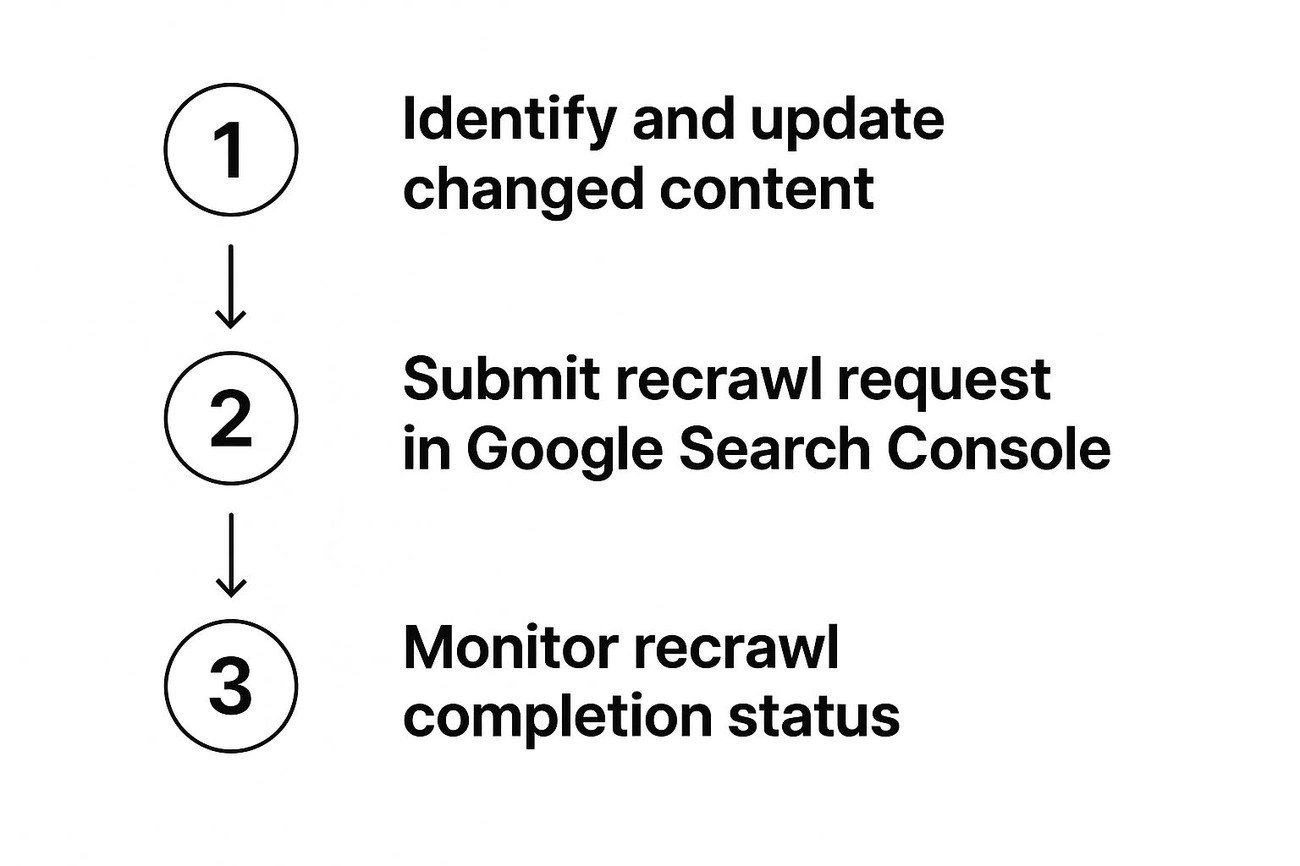
After fixes ship: update the content, request a recrawl, then monitor completion in Search Console.
A technical SEO audit only proves its value when findings lead to fixes, so I end every audit with a report designed for action, not documentation alone.
Evidence, Affected URLs, and Effect-Based Priorities
I never list a problem without proof — screenshots and affected URL lists, backed by the exact tool output. I prioritize problems by severity:
I flag quick wins, such as broken links that teams can fix within 48 hours, separately from rarely visited pages that do not justify the effort.
Fix Owners, Effort Estimates, and Acceptance Criteria
I assign an owner to each item, because Core Web Vitals, schema, and mobile fixes often require developer support. I deliver fixes in stages instead of sending one long report — this keeps the workload realistic, often with one or two actions at a time.
Recrawls, Search Console Monitoring, and Audit Frequency
Once fixes ship, I review Search Console each week for indexing and ranking changes. I run a full technical SEO audit checklist every six months and a mini audit each month. Migrations or indexing drops also trigger an additional review, because crawlability often improves within a month, while rankings can take up to six months.
Conclusion
Crawlability, architecture, speed, security, and markup are the backbone of every technical SEO audit I run. Missing even one of these areas leaves ranking potential on the table.
Broken links and sitemaps matter, but fixing them without reviewing Core Web Vitals only addresses part of the issue. Proving schema is right without confirming HTTPS creates the same problem. My technical SEO audit template ensures nothing is missed, and every fix has evidence, clear ownership, and a deadline.
After fixes go live, I check Search Console each week and rerun the full checklist every six months. Consistent follow-up, not a one-time scan, keeps rankings moving forward.
- A complete technical SEO audit helps search engines crawl, understand, and rank your site while improving mobile user experience.
- Prioritize crawlability: audit robots directives, sitemaps, canonicals, JavaScript rendering, and server logs so important pages are accessible and indexable.
- Strengthen architecture with crawlable navigation, shallow click depth, descriptive internal anchors, and controls for orphan pages, redirects, facets, and pagination.
- Test every page template on real mobile conditions; improve LCP, INP, CLS, server response times, images, fonts, caching, and responsive content parity.
- Validate HTTPS, status codes, metadata, headings, structured data, and hreflang to build trust and qualify relevant pages for enhanced search results.
- Turn findings into accountable fixes: document evidence and affected URLs, prioritize by impact, assign owners, then monitor Search Console and recrawl regularly.
Want This Done for You?
Running this checklist yourself takes real time — representative-template speed testing alone can eat a full day, and log file analysis requires server access most business owners never touch. If you'd rather hand it off, I run full technical SEO audits for agencies that need white-label support and e-commerce brands that need their product and category pages properly indexed and ranking.
Post your comment
Comments
No one has commented on this page yet.
RSS feed for comments on this page | RSS feed for all comments